How to use GPT-6 Astra in Roblox Studio
GPT-6 Astra shipped from OpenAI in early September 2026, and within days the demos were everywhere — a Mario-Kart-style racer built in Roblox Studio in half an hour, feeds full of "Astra + Roblox Studio is insane" clips. The demos are real enough. What they usually skip is the plumbing: a chat window can't see your game, and pasting code into the wrong service is still on you.
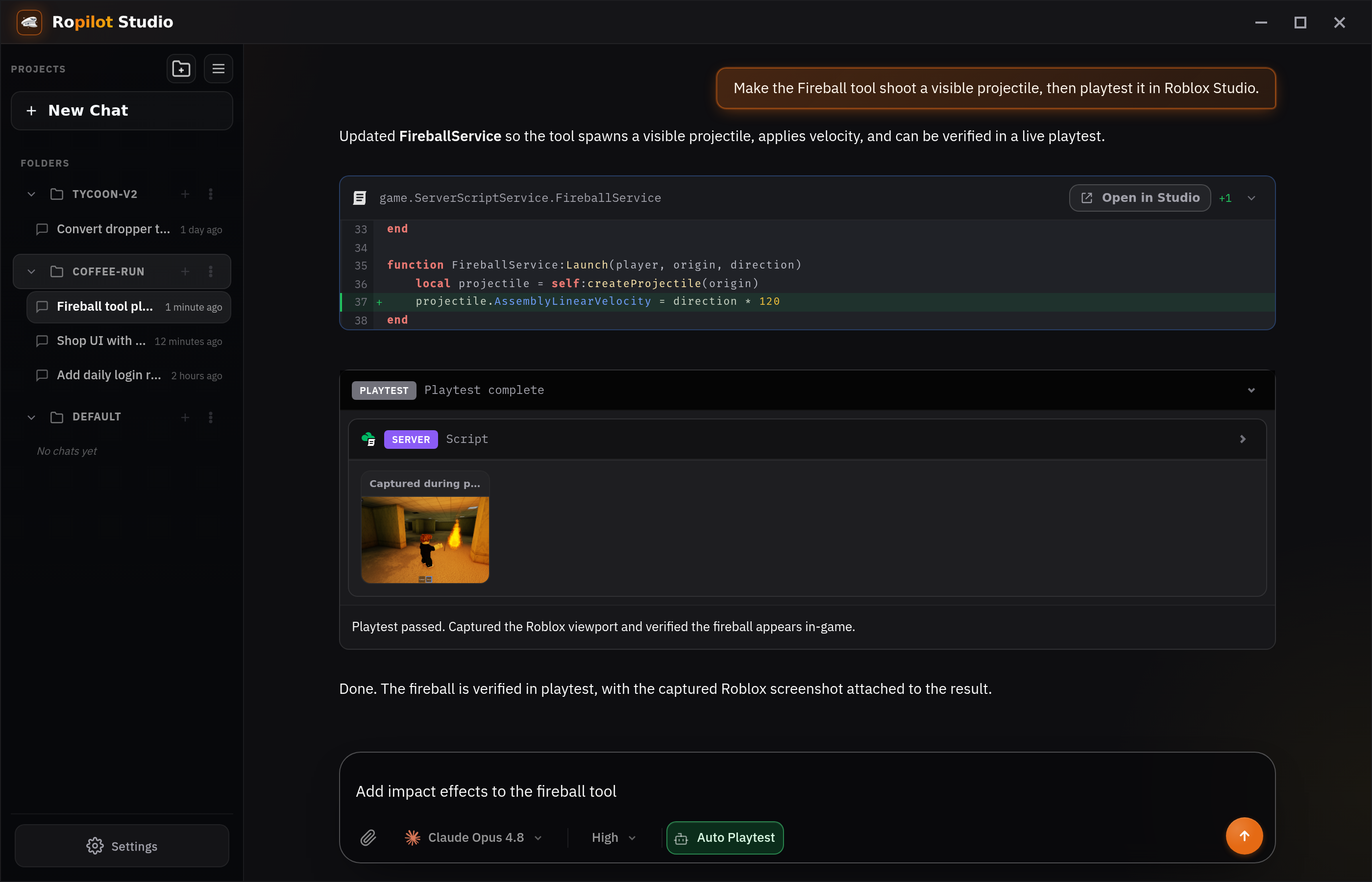
This guide covers the practical version: how to run GPT-6 Astra inside Roblox Studio with Ropilot, where it reads your actual project, writes the Luau in place, runs the playtest, and fixes what breaks. No copy-paste, no manual MCP configuration.
What you need
- Roblox Studio installed, with the place you want to work on.
- Ropilot Studio — a free desktop app for Windows, macOS, or Linux that bundles a Studio plugin. Download it here.
- A way to pay for the model — but not up front: new accounts get free starter credits during onboarding, no card required, and Astra is selectable on those.
Step 1: Install Ropilot Studio
Download and run the installer from ropilot.ai/download. Ropilot Studio installs its Roblox Studio plugin for you and walks you through signing in. When you open your place, the plugin connects automatically and syncs your game tree — services, scripts, remotes, UI — so the model works from your real project instead of guessing.
There is no MCP server to configure and no API key to paste into a JSON file. That's the point of the desktop app: the wiring is done once, by the installer.
Step 2: Pick GPT-6 Astra in the model selector
In Ropilot Studio, open the model selector and choose GPT-6 Astra. It sits alongside GPT-5.6 Sol, Claude Fable 5.1, Opus 5, and the rest of the lineup — you can switch per task, mid-project, whenever you like.
One honest note on cost: Astra is the premium model. It uses Ropilot Credits at 2.5x the GPT-5.6 Sol rate. That's worth it for hard, multi-file tasks; for routine edits, Sol is usually the better spend. Nothing stops you from mixing both in one session.
Step 3: Describe the feature — and let it run
Type what you want in plain English. For example:
- "Add a rebirth system with a confirmation screen and a leaderstat."
- "The shop button does nothing on mobile — find out why and fix it."
- "Refactor my round loop so intermission and match length are configurable."
Astra reads the relevant parts of your game, writes or edits the Luau across whichever scripts are involved, and applies the changes in your project. Then comes the part a browser chatbot can't do: it starts a playtest, clicks through the feature, captures what the player sees, and if something breaks, it ships the fix and tests again.
You review the changes like you'd review a teammate's work. It's your place; nothing lands without you seeing it.
Does it work on an existing game?
Yes — and this is where in-Studio context matters most. Because Ropilot syncs your game tree, Astra references the instances you actually have, follows your naming, and edits the scripts you already wrote. Generated-in-a-vacuum code that assumes a blank baseplate is the main reason pasted snippets break; working in the real project is the fix.
What it costs (both honest options)
Option A — Ropilot Credits. Ropilot brings the AI; you don't need any other subscription. Free starter credits get you going, Ropilot Plus is $20/month and credit packs start at $8. Remember the 2.5x Sol rate for Astra when budgeting.
Option B — bring your ChatGPT/Codex plan. If you already pay for a ChatGPT or Codex plan, sign in with it and use Astra in Ropilot at a flat rate — no per-prompt surcharge. The same BYOK setup also works with Claude plans.
A realistic first session
Don't start with "build my whole game." Astra is strong, but the workflow rewards concrete asks. A good first hour:
- Pick one feature with visible state — a shop, a checkpoint system, a daily reward.
- Describe it in a couple of sentences, including where it should live if you care.
- Let the playtest run and read the result before asking for the next thing.
- When something's off, say what you saw — Astra can re-run the playtest to confirm the fix.
That loop — describe, build, playtest, fix — is the same one in the viral videos. The difference is that here it's running in your project, with your scripts, and the result is committed to the place you actually ship.
Common questions
Do I need to know Luau? No, but it helps. Non-scripters can describe features and review results in the playtest; scripters can read the diffs, steer the architecture, and use Astra to handle the tedious wiring. Both get more out of it than a copy-paste chatbot workflow.
Astra isn't showing in the selector — why? Make sure Ropilot Studio is up to date; the model rolled out in September 2026, so an older build may not list it. If you're out of credits, a prompt won't run until you top up or sign in with your own ChatGPT/Codex plan.
When should I use Sol or Claude instead? For quick, well-defined edits — renaming, small fixes, boilerplate — GPT-5.6 Sol at the base credit rate is usually the smarter spend. Save Astra for the tasks where a stronger model actually changes the outcome: multi-script features, gnarly bugs, and refactors that touch a lot of the game.

Try GPT-6 Astra in your own game
Install Ropilot Studio, pick Astra, and describe a feature. Free starter credits, no card required.
Download Ropilot Studio